How to Watch TrimixIPTV on Apple TV
Use IPTV Smarters Pro to stream TrimixIPTV on your Apple TV 4K. Get 25,000+ channels in stunning 4K HDR quality.
Requirements
- Apple TV 4K (3rd gen recommended) or Apple TV HD
- IPTV Smarters Pro (free on App Store)
- Active TrimixIPTV subscription with Xtream Codes credentials
- Apple TV connected to your Wi-Fi or Ethernet
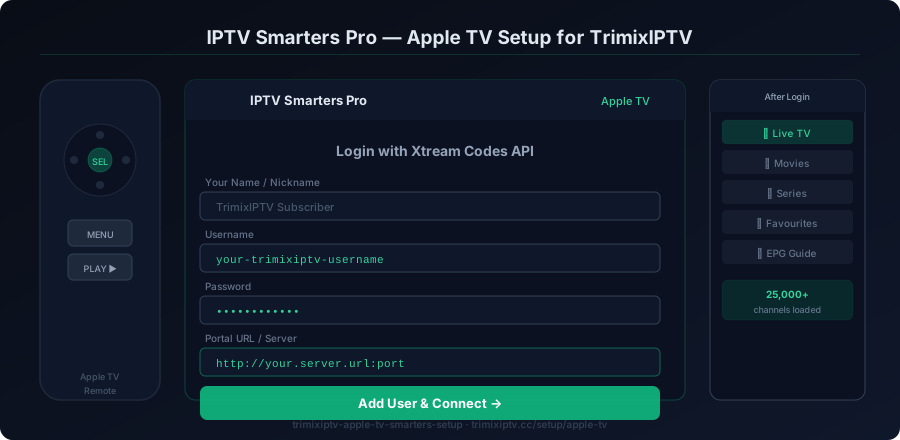
Apple TV Setup Steps
Download IPTV Smarters Pro from the App Store
On your Apple TV, open the App Store. Search for "IPTV Smarters Pro" and download it. This is the recommended IPTV player for Apple TV and supports Xtream Codes, M3U playlists, and EPG.
Launch IPTV Smarters Pro
Open IPTV Smarters Pro. On the welcome screen, select "Login with Xtream Codes API" for the best TrimixIPTV integration. This gives you access to live TV, VOD, and the EPG.
Enter Your TrimixIPTV Credentials
Fill in the three fields: Username — your TrimixIPTV username. Password — your TrimixIPTV password. Server URL — the server address provided in your TrimixIPTV activation email. Tap "Add User" to continue.
Browse and Load Channels
IPTV Smarters will load your TrimixIPTV playlist. Navigate to "Live TV" to see all 25,000+ channels organized by category. Sports, UK, US majors, PPV, and VOD sections are all clearly labeled.
Set Up Favourites
Tap and hold on any channel to add it to Favourites. This creates a personal channel list for quick access to your most-watched content like ESPN, BBC One, or Sky Sports Premier League.
Configure Video Player Settings
In IPTV Smarters settings, set your preferred player to the native player for 4K Apple TV compatibility. Enable hardware decoding for smooth 4K HDR playback. Adjust buffer size if needed.