How to Install Trimix IPTV on Amazon Firestick 4K
Complete Downloader workflow, TiviMate Xtream Codes setup, and buffer-free hardware tuning for Fire TV Stick 4K Max, Fire TV Cube, and Lite.
Quick Summary (Inverted Pyramid Answer)
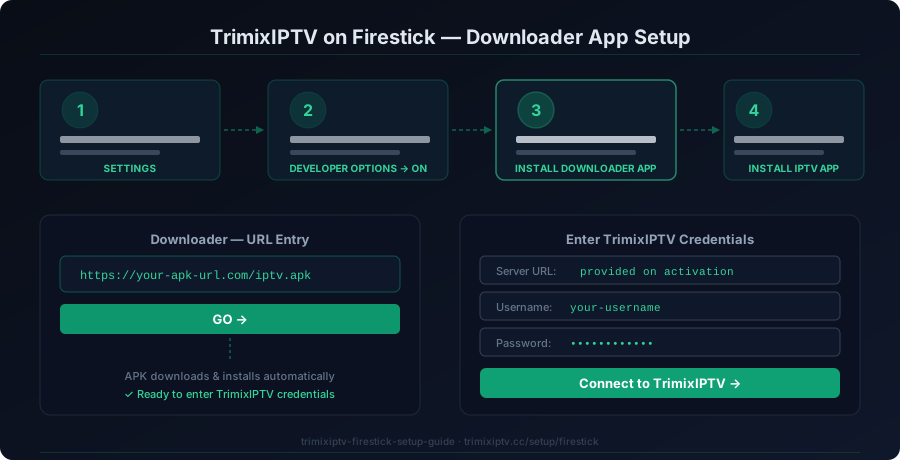
- Step 1: Unlock Developer Options (Settings > My Fire TV > About > click model name 7 times) and allow Downloader to install unknown apps.
- Step 2: Open Downloader, download TiviMate or IPTV Smarters, and select Xtream Codes API login.
- Step 3: Enter your Trimix IPTV Server Portal URL, Username, and Password sent via WhatsApp to synchronize 25,000+ 4K channels and EPG.
1. Hardware & Network Prerequisites
To ensure 4K 60fps streaming without dropped frames on Trimix IPTV:
- Amazon Fire TV Stick 4K (2018 or newer), 4K Max (1st or 2nd Gen), or Fire TV Cube.
- Minimum 15 Mbps connection speed for Full HD; 35+ Mbps for live 4K HDR streams.
- Active Trimix IPTV subscription or instant 24h trial credentials.
- Free storage space of at least 350 MB on your Firestick for player cache.
2. Unlock Developer Options on Fire OS 7 & 8
Recent Amazon Fire OS updates hide Developer Options by default. Follow this standard unlock sequence:
- Open Settings (gear icon on the right side of the Firestick home screen).
- Select My Fire TV > About.
- Highlight your Firestick model name (e.g., Fire TV Stick 4K Max) and press the Select button on your remote 7 times consecutively.
- You will see a notification saying: "No need, you are already a developer."
- Press the back button, enter Developer Options, and toggle Install Unknown Apps or Apps from Unknown Sources to ON.
3. Install Downloader & Fetch IPTV Player APK
From the Fire TV Appstore, search for Downloader. Once opened, enter the numeric quick code or the APK URL in the URL box:
275369809114. Configure Xtream Codes API (Recommended)
We strongly recommend logging into TiviMate or IPTV Smarters using Xtream Codes API rather than raw M3U playlist URLs, because Xtream Codes dynamically refreshes EPG schedules, VOD series posters, and multi-resolution server streams.
http://portal.trimixiptv.cc:8080 (provided in activation message)your_assigned_username••••••••••••Test Trimix IPTV on Your Amazon Firestick
Verify 4K sports stability, EPG speed, and zero-buffering anti-freeze technology with a risk-free 24-hour test pass.
5. Firestick Performance Tuning & Buffering Mitigation
Clear Firestick App Cache Periodically
Go to Settings > Applications > Manage Installed Applications > TiviMate > Clear Cache. Do NOT select Clear Data unless you want to re-enter credentials.
Switch to 5GHz Wi-Fi Band or OTG Ethernet Adapter
The standard 2.4GHz Wi-Fi band suffers from microwave and Bluetooth interference. Connect to your router's 5GHz SSID or use an Amazon Ethernet adapter for zero packet loss.
Set Stream Format to HLS or MPEG-TS
In TiviMate Settings > Playlists > Trimix IPTV > Xtream Codes parameters > Output Format, choose HLS for lower latency or MPEG-TS for legacy compatibility.